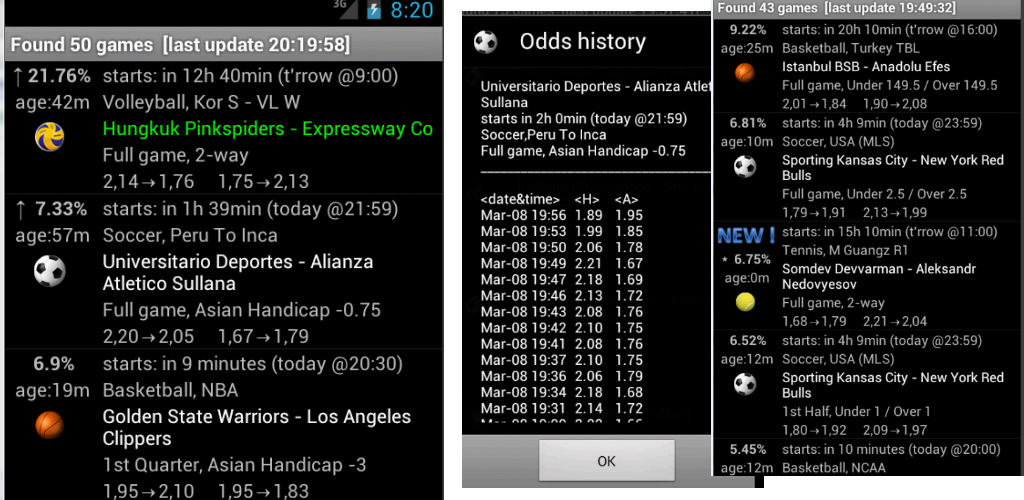
Mobile app offers same features as app for PC.

Application is available on google play for free !

170px-Get_it_on_Google_play.svg
publish1

FAQ:

>> I can’t find it in google play <<
here’s the link to direct .apk installation file

>> Why some game information are hidden? <<
In demo version not allgame information are available. To activate full access you need valid sub (5 days sub or 1 month sub)

>> App does not work in background <<

Reason:
You’ve run into one of the most common issues on Android: Doze mode and aggressive battery optimizations. By default, Android (and especially some OEMs like Xiaomi, Huawei, Oppo, Samsung) will put apps to sleep if they run too long in the background.
Here’s how you (or your app’s users) can change the settings so the app keeps running in the background:

1. Disable Battery Optimization for “Dombetting Mobile”

  • Open Settings Apps & notifications (or just Apps on some devices).
  • Apps Management
  • Find “Dombetting Mobile” in the list.
  • Tap Battery Battery optimization.
  • Switch from Optimized → Don’t optimize (or Allow background activity).
    In some android version Enable Allow background activity (sometimes worded as Run in background).

2. Allow permissions
Still in “Dombetting mobile”:

  • App info → App permissions, make sure Notifications permission is allowed.
  • App info → Pause app activity if unused, make sure this option is turned OFF (so Android won’t automatically hibernate your app after some time).

3. Exclude from “Sleeping Apps” / “Adaptive Battery
On Samsung / Xiaomi / Huawei and others:

  • Go to SettingsBattery or Device care.
  • Look for App power management / Sleeping apps.
  • Remove your app from the “sleeping” or “restricted” list.

4. Check for third-party battery saving apps

  • Ensure your app is not restricted by other battery-saving apps such as Greenify, Battery Doctor, or similar tools.
  • If such apps are installed, whitelist “Dombetting Mobile” inside them.